
Paste JSON data and get SQL INSERT statements back instantly — no upload, no account, no waiting. The conversion runs in your browser, so your data never leaves your device. Copy the statements, or download them as a .sql file ready to run against your database.
An INSERT statement is the standard way to load JSON records into a relational database: one statement per row, with the column list and the values spelled out. The table name defaults to items and you can change it in the box above the output. For the same data as a spreadsheet, JSON to CSV is the lighter route, and JSON to Excel (XLSX) builds a real workbook.
How to use
- Paste your JSON data into the input box, or press Sample to load two example customer records.
- The INSERT statements appear automatically as you type — one statement per row.
- Change the table name in the box above the output if your table is not called items.
- Copy the statements, or download them as a .sql file with the Download button.
Why use Toolsvine
Loading JSON into a database usually means writing a script or hand-typing INSERT statements — both slow and error-prone when the data has quotes, nulls, or booleans. This converter writes the statements locally in your browser, escapes single quotes by doubling them, turns nulls into NULL, and shows every statement in a preview so you can check the values before you run them.
How does JSON to SQL INSERT work?
JSON to SQL INSERT turns each object in your JSON array into one INSERT statement: the object's keys become the column list, and each value becomes a value in the same order. Two customer records become two statements against the table you name — items by default — each ending with a semicolon.
Values are typed the way SQL expects: strings are wrapped in single quotes with any internal quote doubled, so O'Brien becomes 'O''Brien'; numbers stay bare, so 28 is the number 28; booleans become TRUE or FALSE; and null becomes NULL. Nested objects become a JSON string inside quotes, so the data survives even if the column cannot hold a structure.
What happens to tricky values
| Detail | How it is handled |
|---|---|
| Table name | items by default, change it in the box above |
| Strings | Single-quoted, internal quotes doubled |
| Numbers | Bare, never quoted |
| Booleans | TRUE or FALSE |
| Null and missing | NULL |
The table name is checked before it is used: a plain name like customers goes in as-is, and anything with spaces or special characters is wrapped in double quotes so the statement stays valid. If you paste a single JSON object instead of an array, you get one statement — and a top-level number or string is rejected with a plain-English error, since a row needs fields to insert.
Worked example: two customers become INSERT statements
Start with the same two customer records the Sample button loads: Alex, 28, Austin and Jordan, 31, Dallas. Each record becomes one statement against the items table, with the columns in the order they appear in the JSON. Strings carry quotes while ages do not — 28 is a number in JSON, and it stays a number in SQL.
Example input:
[{"name":"Alex","age":28,"city":"Austin"},{"name":"Jordan","age":31,"city":"Dallas"}]
Becomes:
INSERT INTO items (name, age, city) VALUES ('Alex', 28, 'Austin');\nINSERT INTO items (name, age, city) VALUES ('Jordan', 31, 'Dallas');
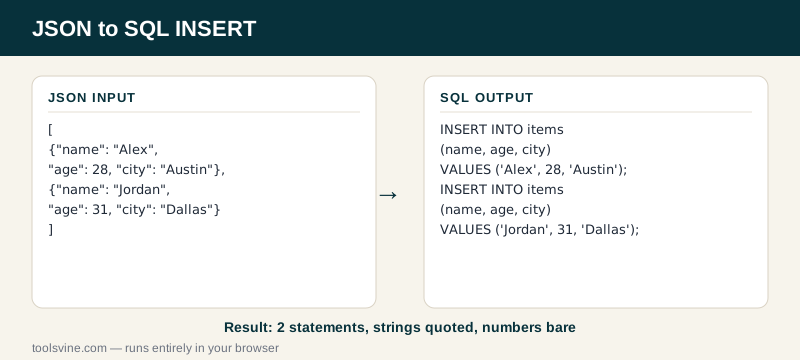
Try it yourself: change the table name to customers in the box above the output and watch both statements update at once. Then add a middle record for Taylor in Houston — a third statement appears, and the column order stays name, age, city because the keys arrive in the same order. If the same records need to land in a spreadsheet first, the JSON to CSV converter writes them as a table.
Is it safe to run the SQL this tool generates?
The statements are safe to read and edit, but you can decide whether they are safe to run — always check the table name and the values first, and test them on a copy of the database when the data matters. The converter escapes quotes and types values correctly, but it cannot know whether items is the table you meant.
Two habits keep imports boring: wrap the statements in a transaction when your database supports it, so a bad row rolls the whole import back instead of leaving half the data behind, and keep a backup of the table before a large import. The converter's job is to write correct statements — the decision to run them stays yours.
Frequently asked questions
Is converting JSON to SQL INSERT free?
Yes — completely free, with no account, no upload limits, and no watermark on the output. The conversion runs entirely in your browser, so there is no server involved and no cost to pass on. You can convert one record or a thousand rows and the price stays the same: nothing.
Is my JSON data uploaded anywhere?
No. The statements are built on your device by JavaScript running in the page, and nothing is sent anywhere. That matters when the records hold customer names, email addresses, or internal IDs — data you would never paste into a stranger's server stays safe here because it never leaves your browser.
What happens if my JSON is invalid?
The tool shows a plain-English error naming the line with the problem — a missing quote, a trailing comma, or an unclosed bracket, for example — and leaves the output empty instead of guessing. Fix the error in the input box and the statements rebuild automatically, usually before you finish typing the correction.
How are quotes in my data handled?
Single quotes inside a string are doubled, which is the SQL standard for escaping them. O'Brien becomes 'O''Brien', and a value made only of quotes gets the same treatment. Double quotes inside a value are left alone, since SQL strings use single quotes. If a statement still fails, check the value first — a doubled quote is easy to mistake for a typo.
Can I change the table name?
Yes. The box above the output holds the table name, and it defaults to items. Type customers, orders, or whatever your schema uses, and every statement updates at once. A plain name goes in as-is, and a name with spaces or special characters is wrapped in double quotes so the statement stays valid.