
Writing a page title or a meta description and wondering whether Google will cut it off? This free checker counts the characters in your title and description and tells you, at a glance, whether each one fits inside Google's display limits — good, a little long, or too long.
Checking happens entirely in your browser: your copy never leaves your device, and the tool works offline once the page has loaded. Once the lengths pass, preview how the result will look with the SERP Snippet Preview (Google), or check the exact pixel width with the Title Pixel Width Checker.
How to use
- Paste your page title into the title box.
- Paste your meta description into the description box.
- Read the counts and the pass, warn or too-long verdict for each.
- Trim the red one until both show green, then copy your tags.
Why use Toolsvine
A title or description that gets cut off mid-sentence looks unfinished in the search results, and the part Google hides is usually the part that would have earned the click. This checker exists so you can see the verdict before you publish: it applies Google's own rough limits — 60 characters for titles, 140 to 160 for descriptions — and tells you plainly when a line needs trimming, instead of leaving you to guess from a character count alone.
What are Google's limits for titles and descriptions?
Google shows roughly the first 60 characters of a title and the first 155 to 160 characters of a meta description on desktop search results, and anything longer is usually cut off with an ellipsis, so the safe targets are a title of 50 to 60 characters and a description of 140 to 155 characters.
Those ranges almost always display in full on desktop.
The checker scores each field against those limits. A title of up to 60 characters is “Good — fits Google's display”, 61 to 70 is “A little long — may be cut off”, and anything over 70 is “Too long — will be cut off”. A description of 140 to 160 characters is good, 120 to 139 or 161 to 170 is a warning, and anything under 120 or over 170 is too short or too long. The description band is wider on purpose: Google rewrites descriptions often, so a description slightly outside the ideal range still has a chance of showing.
Worked example
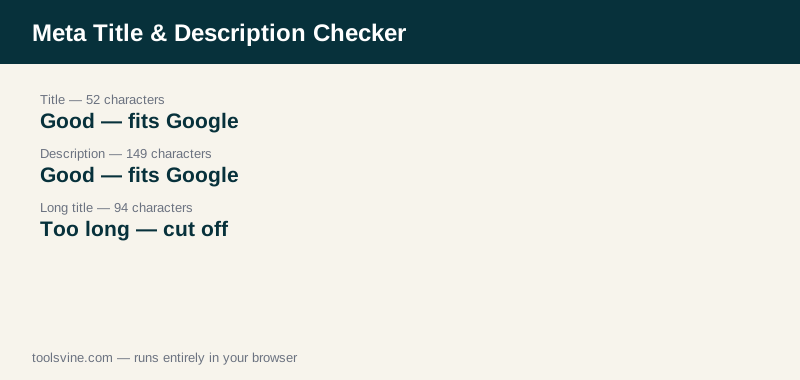
Take a product page for running shoes. The title “Best Running Shoes for Flat Feet in 2026 | Top Picks” is 52 characters, so the checker calls it “Good — fits Google's display”. The description “Shop the best running shoes for flat feet in 2026. Top-rated picks for arch support, cushioning and pain-free miles, tested by real runners in Texas.” is 149 characters, also good. But the longer title “The 10 Best Running Shoes for Flat Feet in 2026: Top Picks, Reviews & Buying Guide for Comfort” is 94 characters, so the checker calls it “Too long — will be cut off” — Google would hide the ending, including the buying-guide promise.
Characters are not the whole story
Google actually measures titles in pixels, not characters — a title full of wide letters like “W” and “m” is cut off sooner than one full of narrow letters like “i” and “l”. Character counts are a good first check, but when a title is close to the limit, measure it in pixels to be sure. Mobile results also show less than desktop, so a title that barely fits on desktop may still be truncated on a phone.
How do I fix a title or description that is too long?
Cut filler words first, put the main keyword at the front, and drop the brand suffix if the title still does not fit — the keyword and the benefit should survive, the rest is negotiable. Aim for 50 to 60 characters for the title and 140 to 155 for the description, then re-check.
For titles, the most reliable trims are removing the year when it is not doing work, cutting a second benefit phrase, and replacing “and” with a comma or a pipe. For descriptions, open with the main benefit, keep one clear promise, and end with a gentle call to action such as “Shop now” or “Read the guide”. If the description is too short, add a specific detail — a number, a place, or a result — rather than padding it with vague adjectives, because Google is more likely to keep a description that says something concrete.
Frequently asked questions
Why is my title cut off even when it is under 60 characters?
Google measures titles in pixels, not characters. Wide letters such as W and M take far more room than narrow letters such as i and l, so a 58-character title full of wide letters can still be truncated. The Title Pixel Width Checker measures the same title in pixels, which is the exact number Google cares about.
Is my text uploaded anywhere?
No. The checking runs entirely in your browser with JavaScript. Your copy never leaves your device, and the tool works offline once the page has loaded. You can paste draft titles for unpublished pages without worrying that anyone else will see them.
How long should a meta title be?
Aim for 50 to 60 characters. Google displays roughly the first 60 characters on desktop, and longer titles are truncated with an ellipsis. Shorter than 50 is fine too, as long as the title still says what the page is about and includes the main keyword near the front.
How long should a meta description be?
Aim for 140 to 155 characters. Google shows about 155 to 160 characters on desktop, and longer descriptions are cut off mid-sentence. A description under 120 characters is usually too thin to describe the page well, so add a specific benefit or a number instead of filler.
Does Google always show my meta description?
No. Google rewrites or replaces the description in roughly two-thirds of results, usually with text from the page that matches the search. A good description still helps, because Google uses it when it fits the query, and it sets the message for the searches where it does appear.