
Before you publish a page, see exactly how it will look in Google's search results: the blue title, the green URL, and the description underneath, laid out the way Google lays them out. Paste your title, URL, and meta description and the preview updates live as you type.
The preview runs entirely in your browser — nothing is uploaded, and you can test drafts for pages that do not exist yet. When the snippet looks right, check the character counts with the Meta Title & Description Length Checker and make the URL itself cleaner with the URL Slug Generator.
How to use
- Type your page title, URL and meta description into the boxes.
- Watch the Google-style result update live below.
- Trim anything that shows an ellipsis, then publish with confidence.
Why use Toolsvine
A search result is a tiny ad for your page, and most of the time the title and description are the only things a searcher ever reads before deciding to click. This preview exists because guessing what Google will show is a bad way to write copy: seeing the snippet — including where Google would cut it off — lets you fix the title and description while they are still drafts, instead of discovering the truncation weeks later in the search results.
What does a Google search snippet look like?
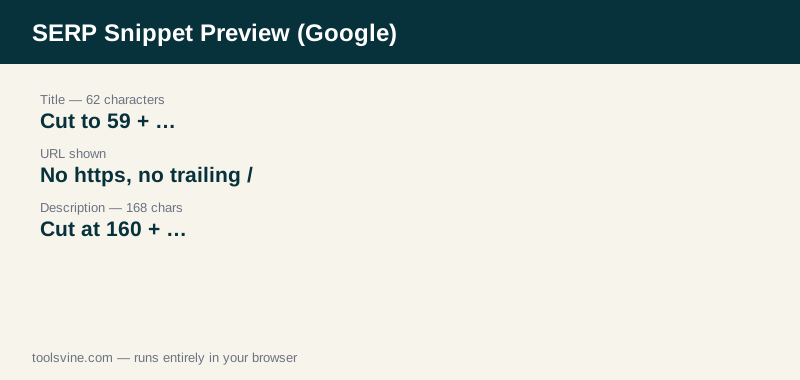
A Google snippet has three parts: the clickable title in blue, the page URL below it, and the description in gray underneath. Google truncates the title at about 60 characters and the description at about 160 characters, strips the “https://” from the URL, and drops any trailing slash — and this preview applies exactly those rules.
The preview is a close model of the desktop result, not a screenshot of Google: the real Google measures titles in pixels, so a title of wide letters can be cut sooner than a title of narrow ones, and mobile results show slightly less. Treat the preview as the honest answer for character length, and leave a little margin if your title is full of wide capital letters.
Worked example
Take a running-shoe guide with the title “Best Running Shoes for Flat Feet in 2026 | Top Picks & Reviews”, the URL “https://www.example.com/best-running-shoes-flat-feet/”, and the description “The best running shoes for flat feet in 2026, with top-rated picks for arch support, cushioning and pain-free miles. Read the full review before you buy your next pair.”. The title is 62 characters, so the preview shows “Best Running Shoes for Flat Feet in 2026 | Top Picks & Revi…”. The URL is shown as “www.example.com/best-running-shoes-flat-feet”, without the protocol or the trailing slash. The description is 168 characters, so the preview shows “The best running shoes for flat feet in 2026, with top-rated picks for arch support, cushioning and pain-free miles. Read the full review before you buy your n…”.
Reading the preview like a searcher
Read the preview the way a stranger would: does the title say what the page is about in the first few words, and does the description give one clear reason to click? Numbers, years, and specific promises (“top-rated picks”, “tested by real runners”) earn clicks; vague praise does not. If the preview cuts off the most interesting word, rewrite so the interesting part comes first — Google will not move it for you.
How do I write a snippet that gets clicked?
Put the main keyword near the front of the title, promise one specific benefit in the description, and keep both inside Google's limits so nothing important is cut off. A title that matches the search and a description that answers “why this page?” beats a longer title that trails off into an ellipsis.
Match the searcher's intent, not just the keyword: someone searching for running shoes wants a recommendation, so “top-rated picks” and “tested by real runners” work better than a list of features. Avoid stuffing the keyword twice, avoid ALL-CAPS, and never write a description that simply repeats the title — the description is your one chance to add a reason to click.
Frequently asked questions
Does the preview match Google exactly?
It matches the desktop snippet closely: the title is cut at 60 characters, the description at 160, and the URL is shown without the protocol or trailing slash. The real Google measures titles in pixels, so a title full of wide letters can be cut a little sooner, and mobile results show slightly less than desktop.
Why is my URL shown differently than I typed it?
The preview strips the “https://” or “http://” prefix and removes a trailing slash, the same way Google's results do. If your URL is longer than 60 characters it is also truncated with an ellipsis. The path itself is shown unchanged, so a clean, short slug reads best here.
Does Google always use my title and description?
No. Google rewrites titles when they are too long, missing, or stuffed with keywords, and it replaces descriptions in roughly two-thirds of results with text from the page that matches the search. A title and description inside the limits, written for the searcher's query, are the most likely to survive unchanged.
Can I preview the mobile snippet too?
This preview models the desktop layout. Mobile results use the same title and description but show less of them, so if your title only just fits on desktop it may be cut on a phone. Keep the keyword and the main benefit in the first 50 characters and the snippet survives on both screens.
Is anything I type uploaded anywhere?
No. The preview is rendered entirely in your browser, and nothing you type leaves your device. You can test titles and descriptions for pages that do not exist yet, or for pages you would rather not share, without sending the text to any server.