
Google does not count the characters in your title — it measures the pixels. A title full of wide letters like W and M is cut off much sooner than a title of the same length made of narrow letters like i and l. This checker measures your title with a real canvas, the same way a browser measures text, and tells you whether it fits inside Google's roughly 600-pixel limit.
The measurement runs entirely in your browser and never uploads your text. Pair it with the Meta Title & Description Length Checker for the character count, and preview the finished result with the SERP Snippet Preview (Google).
How to use
- Type or paste your page title into the box above.
- Read its width in pixels and whether it fits the 600px limit.
- Trim wide letters or shorten the title until it shows green.
Why use Toolsvine
Character counts lie about titles. Two titles can both be 60 characters long while one displays in full and the other is chopped in half, because Google's limit is about 600 pixels of rendered text, not a number of letters. This checker exists to answer the question that actually matters — will this exact title, with these exact letters, display in full? — by measuring it the way a browser does, instead of asking you to trust a rule of thumb.
Why does Google measure titles in pixels, not characters?
Google renders the title in a proportional font, where every letter has its own width, and it cuts the title off once the rendered width passes about 600 pixels on desktop, so a 60-character title of narrow letters can fit while a 52-character title of wide letters is truncated.
The character count alone cannot tell you whether a title will display in full.
This tool measures your title on a canvas set to 16px Arial, the same measurement a browser performs when it lays out text. A result up to 600 pixels is “Fits — displays in full on Google”, 601 to 650 is “Borderline — may be cut off”, and anything over 650 is “Too wide — will be truncated”. The bar under the result shows the width as a percentage of the 600-pixel limit, so you can see at a glance how much room is left.
Worked example
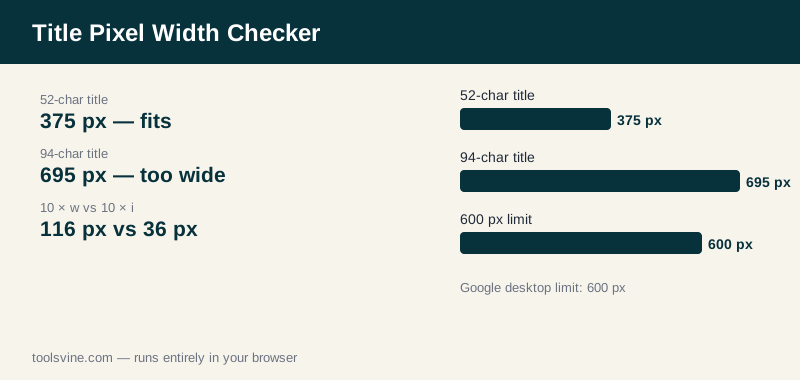
The title “Best Running Shoes for Flat Feet in 2026 | Top Picks” is 52 characters and measures 375 pixels, so it fits comfortably. The longer version “The 10 Best Running Shoes for Flat Feet in 2026: Top Picks, Reviews & Buying Guide for Comfort” is 94 characters and measures 695 pixels — too wide, and Google would cut it off. The difference between letters is stark: ten “w” letters measure 116 pixels, ten “i” letters only 36 pixels, and ten “M” letters 133 pixels.
How do I shorten a title that is too wide?
Shorten the widest words first, because a single wide word can cost as much as three narrow ones: swap long words for short synonyms, drop the brand suffix, and cut the second benefit phrase. Then re-measure — a title that drops from 695 to under 600 pixels keeps the same meaning and finally displays in full.
Capital letters are wider than lowercase ones, so a title in Title Case measures wider than the same words in sentence case, and words with many W, M, and m letters are the most expensive of all. If you are just over the limit, try lowercasing a word or two, removing the year, or replacing “and” with a comma or a pipe — each of those small edits buys back a surprising amount of width.
Frequently asked questions
What is the exact pixel limit for a Google title?
About 600 pixels on desktop. This tool calls up to 600 pixels a fit, 601 to 650 borderline, and anything over 650 too wide. Google does not publish an exact number and the limit shifts slightly with the font and the device, so treat 600 as the line and leave a small margin under it.
Is the limit the same on mobile?
No. Mobile search results show less of a title than desktop, so a title that only just fits at 600 pixels on desktop may still be cut on a phone. If mobile traffic matters to you, aim for about 500 pixels or less — roughly a 50-character title — and the title survives on both screens.
Does the font matter for the measurement?
Yes, but only a little. The tool measures with 16px Arial, which is close to the font Google renders titles in, so the number is a reliable guide rather than an exact copy of Google's rendering. Bold text and all-caps text measure wider than regular text, so a title with many capitals needs extra room.
Why do two 60-character titles measure so differently?
Because letters have different widths in a proportional font. Ten “w” letters measure 116 pixels, ten “i” letters only 36, and ten “M” letters 133. A title full of wide letters can be twice as wide as a title of the same length made of narrow letters, so length alone never tells the whole story.
Is my title uploaded anywhere?
No. The measurement happens on a canvas inside your own browser, and the text never leaves your device. You can test titles for unpublished pages without sending them to any server, and the tool works offline once the page has loaded.